Category Archives: Web Accessibility

Accessibility user testing rules OK!

In my experience there are some people who really “get” the whole idea of accessibility, be it web or anything else. They understand the need for web site accessibility testing in the real world with disabled users. There are others, who have learned about its importance, sometimes through bitter experience. They too now understand the need for accessibility testing.

There is still a fairly large group of people who do not understand at all. It is not necessarily malice aforethought, although there are perhaps a very few who think that we crips and blindies and the like are such a small minority that we are really just an irritating nuisance.

But many people still genuinely and sincerely think that if you tick all the boxes for the web standards it will all work like magic. I wish it would, Standards are the basics. Get them right and it won’t be as hard to fix the rest. Web standards are objectively measurable. Many of the other elements which contribute to a truly accessible and usable web site are not objectively measurable. For example, there are still big debates around the use of colour, and in particular colour contrast. Look and feel is another contentions one, as is good navigation, never mind the level of language used on the site.

Standards will, and can, only go so far. The rest is up to planners, designers, information architects, web builders, techies, information managers, content writers and everyone who maintains the site. Listening to and learning from the people who use the site is critical, and learning from their experience, good and bad, will make the real difference between an accessible and usable site, and an inaccessible and user unfriendly site for disabled and older people and everyone else. A lot depends on how much the site owner cares about the customer.

AccEase people are passionate about making sure that all of the information for all of the people all of the time is a reality. To this end we will be increasing our user testing services soon to help web site owners make their sites more accessible. Watch this space!

Testing web sites with disabled people and implementing the test findings will make a difference, not only to us, who are after all 20% of the population, but to other users as well.

Nothing about us without us!

Leave a Comment

Filed under Information Accessibility, Web Accessibility

High contrast site? Low access

Colour contrast is really important to me, and lots of other people with partial sight. I don’t use any enlarging software – Firefox works well enough, even if some sites break, which they often do. Sadly most web site designers and builders simply don’t get it.

So here I go, harping on about it again.

www.456bereastreet.com
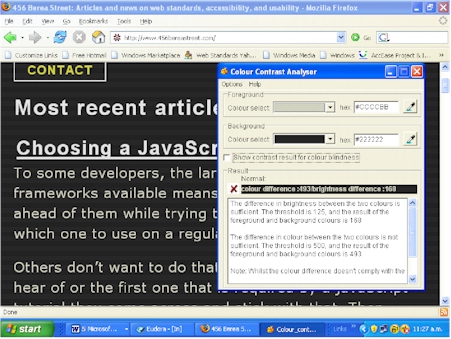
was recommended as a useful site for access info. Well maybe… If we want our sites and the information they contain to be credible then we have to walk the talk. Here’s an example of a site where they just don’t quite get it.

poor_contrast_1.jpg

The site is generally grey text on a white background, which actually meets the accessibility standard for colour contrast. But wait there’s more. The site attempts to helpfully offer a high contrast option which fails miserably on almost all counts, passing just one colour blindness test. The measurement tool I use is from Vision Australia, based on the W3C standard, and gives accurate, trustworthy and reliable results in my experience.

poor_contrast_2.jpg
You really gotta wonder!

Leave a Comment

Filed under Miscellaneous, Web Accessibility

Presentations, powerpoints and pdfs (again!)

To say that accessible information goes beyond web sites would seem to be obvious to the most unthinking, yet this is sadly not true.

Recently I was involved in running a meeting where presenters were asked to ensure their presentation was accessible to a mixed disability audience. I did not have time to advise so trusted the presenters to do their best, which they did.

The results were mixed. Everyone had obviously given the matter some thought. No one used PowerPoints, although one presenter had prepared one and helpfully distributed large print copies which everyone except the blind people could access to some degree.

Presenters talked through their presentations and the meeting was lively and participatory, and I think successful. We had hired Sign interpreters, and the day was carefully structured and facilitated, but we probably all could have done more to make the information conveyed completely accessible. Jargon is something to be watched, for example.

It is always a challenge meeting the information requirements of a diverse disabled audience at meetings and other events.

  • The process begins with finding a venue and physical access considerations.
  • Presenters need to be able to work with Sign interpreters, (not difficult to learn, even for fast talkers like me.) They must be able to communicate often abstract and complex ideas to an audience with the usual range of understandings of any given topic and different cognitive and sensory impairments.
  • As well there are all the peripheral things to deal with such as external noise, room temperature too hot or too cold, people who don’t turn off their mobiles etc etc.

But it is a challenge I enjoy. I feel passionately about the right of disabled people to have access to information and the range of democratic processes, and it is an area where you can always learn something. Sometimes I feel frustrated though when public bodies have done the right thing at one level, but still don’t know why they have done it and don’t really “get” this diverse communication thing.

For example take a particular consultation, and I won’t name the organisation – my object is not to shame them but to help them and others learn. They dutifully put their consultation document on their web site in another more accessible format than pdf, as required for good reason by the government web standards, and good on them, but they then undermined their own efforts and sent the pdf only to a disability organisation.

Fortunately, the intrepid recipient followed the link back to the web site and retrieved the situation, but what a waste of effort, and so easily done, with good PR as a spinoff.

Another public consultation which is critical for disabled people to know about was not so easily sorted. Some of the information was available in accessible HTML. Sadly the crucial bit was only available in what Jakob Nielsen so aptly calls the creature from the black lagoon! The dreaded PDF. We tried printing it off, and it was without doubt one of the worst print documents I have ever seen. An arrangement in grey and white and barely readable it looked like the printer had run out of ink. It hadn’t.

Perhaps we do need a public name and shame campaign before those with responsibility to communicate properly with all New Zealanders will ‘get it’. What price mandatory government standards for web sites?

Leave a Comment

Filed under Information Accessibility, Web Accessibility

Ink on the Internet is free!

The Internet is prone to fashion fads, just like any other aspect of our daily lives, and nowhere is this more obvious than in the use of colour. A couple of years ago orange was all the rage on government and public sector web sites. I was told that this was because there was no political party with orange as its colour! I gave serious consideration to starting one!

That fad has passed thank heavens but the new one is just as bad. It is what that man of good sense Gerry McGovan calls the greying of the Internet. And no, he is not referring to the age of the average user. Apart from the difficulty of reading grey on grey for “normally” sighted people the overall effect is downright depressing. Do web owners really want to reduce their users to a state of depression where they can barely turn on the computer, never mind visit web sites? And don’t they know that ink on the Internet is free? Perhaps it’s the one thing that isn’t affected by climate change and global warming to the point where rationing is essential.

1 Comment

Filed under Web Accessibility